Freedom: App & Website Blocker
- 4.5
- Rating
- 1.00M
- Installs
- Free
- Price

 Analysis by App-foxy
I approached Freedom: App & Website Blocker as a practical productivity tool rather than a dramatic cure for distraction. Its purpose is straightforward: help me create distance from apps and websites that repeatedly interrupt work, study, rest, or personal routines. That sounds simple, but the useful question is whether the blocking experience feels dependable enough to become part of everyday life.
In my experience, the app makes the most sense when I decide in advance what I want to protect. A writing session, a revision period, a quiet evening, or a morning without endless scrolling all benefit from a clear boundary. Freedom, developed by Eighty Percent Solutions Corporation, is a free productivity app with optional in-app purchases, and it is suitable for Everyone. It has built a substantial audience, with over one million installs and a 4.5 average from around eight thousand ratings.
I would not describe it as a replacement for self-discipline. Instead, I see it as a useful layer between an impulse and the distraction itself. That distinction matters. If I want a tool that helps me pause before opening a familiar time-wasting destination, this app is worth considering. If I expect it to organize my entire schedule, manage tasks, or make concentration effortless, I would look elsewhere.
You May Also Like

 Blood Strike: 2.5 Anniversary
Blood Strike’s Loadouts Turn Every Drop Into a Tactical Gamble
A close look at Blood Strike’s custom loadouts: how fast access to signature weapons reshapes its battle royale rhythm, rewards preparation, and narrows the gap between fights.

 Pandora - Music & Podcasts
Pandora’s Music Is Easy to Start, but Harder to Recover
Pandora’s strength is its low-effort path from a seed to a station. Its weak spot is how much confidence it asks you to place in connection, setup, and quiet recovery.

 8 Ball Pool
 Is Built on Rivalries, Rematches, and Routine
A close look at the rivalries, rematches, shared routines, and unanswered safety questions that turn a quick pool match into a persistent mobile community.

 Samsung Music
’s Quiet Strength Is Playing What You Already Own
Its reach comes less from spectacle than from dependable access to a personal library. That simplicity is both the app’s strongest retention engine and its ceiling.

 AccuWeather: Weather Radar
AccuWeather Review: A Quick, Clear Forecast for Everyday Decisions
For everyday plans, the best forecast is the one you can understand quickly. AccuWeather makes rain timing, radar, and local conditions easy to act on, with a few trade-offs.

 Hill Climb Racing
Why Hill Climb Racing Still Turns Crashes Into One More Run
A tiny car, a bumpy hill and one more upgrade: Hill Climb Racing keeps resurfacing because its simple chaos makes every near-miss feel personal.
More From Our News Desk



How Freedom feels during real work
I find Freedom most useful when I treat a focus session as a small, planned boundary rather than a test of willpower. Before starting, I’d decide which sites or apps tend to derail this particular task and keep the blocklist narrow enough that necessary work still feels easy. That practical setup leads to the bigger question: how to make those boundaries fit the changing demands of a real workday.
Quick enough for planned focus sessions
The strongest performance expectation here is not about flashy animation or complex editing. It is about whether I can set up a block without turning preparation into another chore. Freedom’s role is narrow, and that can work in its favor: I am not asking it to become a full project-management system. I am asking it to help enforce a boundary around selected digital distractions.
For a normal session, I would begin by identifying the places that usually pull me away from a task. The important insight is to choose targets based on behavior, not reputation. Blocking every possible distraction can create unnecessary friction, while blocking only the one site I already know I will visit may be too limited. A more thoughtful list might cover a social feed, a news destination, a video site, and a particularly tempting app, depending on the task.
That approach also makes the app feel faster in practical terms. I spend less time adjusting a broad, unrealistic setup and more time starting the work I actually intended to do. The interface does not need to replace my planning; it needs to support it. I found that the best results come from preparing a session before I am already distracted, when my judgment is less likely to bargain with itself.
There is a useful psychological benefit to this workflow. Instead of repeatedly telling myself not to check something, I make the decision once and let the block carry some of the burden. That does not eliminate every interruption, especially if the distraction is offline or available through another route, but it reduces the number of small decisions competing with my attention.
What happens when the phone is under pressure
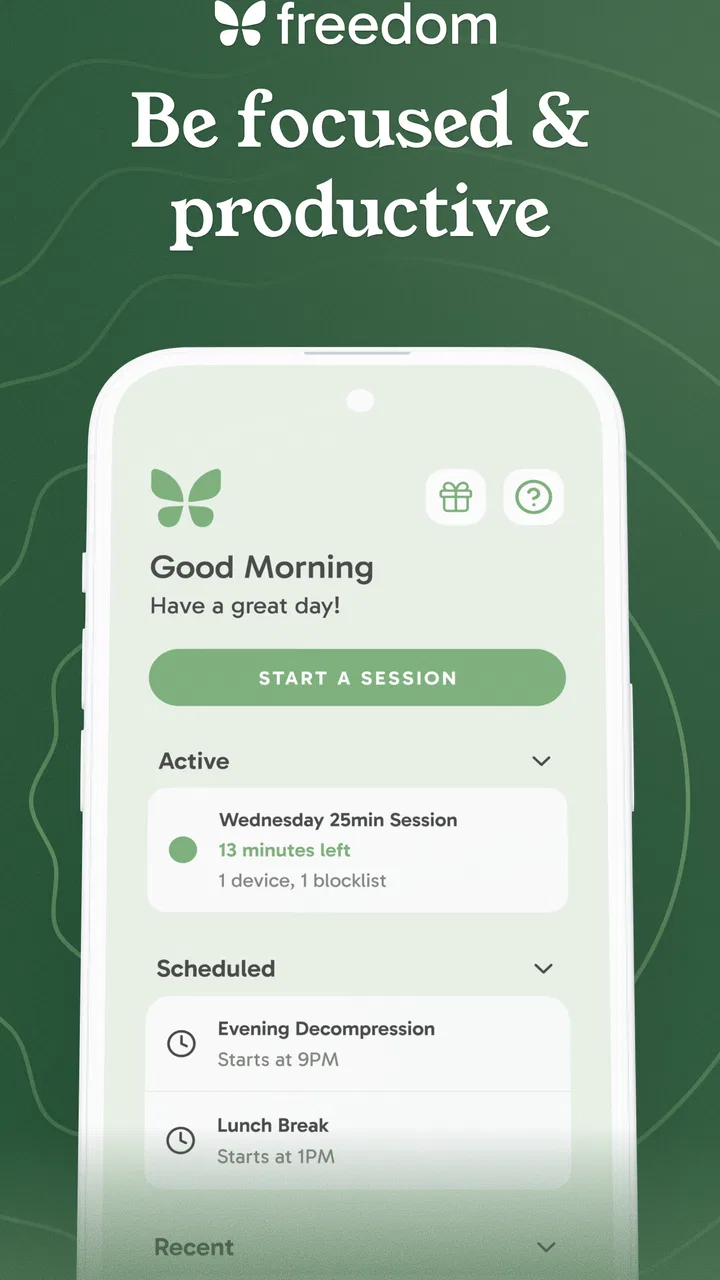
The more demanding test is a busy day with several apps open, notifications arriving, and a task that requires frequent switching. A blocker has to remain easy to understand when I am tired. If I cannot tell whether a session is active, what it covers, or how to adjust it, the tool becomes another source of cognitive load.
This is where I would use Freedom differently for different kinds of work. For deep writing or reading, a firmer block is appropriate because I want fewer reasons to leave the task. For research, communication, or troubleshooting, a narrower setup is safer because an overly broad block can interfere with legitimate browsing. The trade-off is important: stronger restriction can protect concentration, but it can also make normal work feel inconvenient when the blocked destination is genuinely needed.
A realistic example is an afternoon report. I might start with a short preparation period, block the sites that usually trigger “just a minute” detours, and keep the work materials available. If the report requires online references, I would avoid blocking broad categories indiscriminately and focus on the specific destinations that cause trouble. That small adjustment is more valuable than simply choosing the most aggressive setting.
During heavy-use moments, the app’s usefulness depends less on raw device power than on whether my blocking plan matches the job. A poorly designed session feels restrictive and invites me to abandon it. A focused session feels almost invisible because it removes a few predictable escape routes without changing everything else on the device.
Stability is more important than extra decoration
For this kind of application, reliability means I can trust the boundary I created and understand what to do when my routine changes. I would rather have a plain, predictable blocker than a crowded dashboard full of encouragement that does not help when I am tempted to leave a task.
Freedom’s long presence on the market is reassuring in a general sense, and its current version is 7.14.1. Still, I would treat any blocking tool as something to test with my own workflow before depending on it for an important deadline. Websites change, devices behave differently, and work habits are rarely as tidy as a planned session. The sensible approach is to run a short trial during an ordinary work period, then adjust the list rather than assuming the first setup is perfect.
Recovery is another part of reliability that is easy to overlook. If I start a session at the wrong time, forget that I blocked a site needed for work, or change plans unexpectedly, I need a clear way to regain normal access. A useful blocker should help me create intentional limits, not make me feel trapped by a mistake. I therefore recommend beginning with manageable sessions and expanding them only after the routine feels comfortable.
This is also why I would avoid using the app as a substitute for an emergency communication plan. If I am waiting for an important message, coordinating with family, or handling time-sensitive work, I should design the session around those needs. Productivity is not simply the absence of entertainment; it is the ability to give the right attention to the right thing.
Resource demands and device expectations
Freedom is a focused utility rather than a content-heavy creative app, so I would expect its everyday demands to be lighter than those of video editing, gaming, or constant media streaming. The practical concern is not whether it performs spectacular calculations. It is whether it adds enough background complexity to become noticeable during normal use.
The listed minimum operating-system requirement is Android 7.1, which gives the app a relatively broad compatibility range for Android users with older devices. That does not guarantee an identical experience across every phone or tablet, but it does make Freedom more approachable for people who are not using the newest hardware. I would still keep the operating system updated where possible, particularly if blocking behavior is central to my routine.
On an older device, I would judge the app by the whole experience rather than one isolated moment. Does it open when I need to configure a session? Can I understand the current state without repeated attempts? Does normal phone use remain comfortable while the block is active? Those are the questions that matter more than a benchmark score, and they are also the questions a prospective user can answer quickly through a short personal trial.
There is a subtle trade-off between protection and simplicity. The more destinations and rules I add, the more carefully I need to maintain them. A small, well-chosen blocklist is easier to review and less likely to interfere with legitimate tasks. This is one of the app’s less obvious lessons: reducing the number of decisions is helpful, but creating an overly complicated system can recreate the same mental overhead I was trying to escape.
Where it fits among familiar alternatives
Android and iOS already offer built-in screen-time controls, notification settings, and focus-oriented tools. Those options are attractive when I want basic limits without installing another app or paying for optional upgrades. They can be enough for someone who mainly wants awareness, a daily allowance, or a simple reminder to stop.
Freedom is more appealing when my problem is not total screen time but specific destinations that repeatedly derail a task. That is a different need. A person can spend little time on a phone overall and still lose an important work session to one website or app. In that situation, a dedicated blocker feels more directly relevant than a general usage report.
On the other hand, someone looking for a full planner, habit tracker, task manager, or detailed personal analytics should not choose Freedom expecting those functions to be its center of gravity. The app’s value comes from controlling access, not from replacing every productivity tool. I prefer that specialization, but it means the right choice depends on the problem I am trying to solve.
The optional purchase model also deserves a calm look. The app is free to install, while in-app purchases range from $12.99 to $199.99 per item. That broad range means I would inspect the available options carefully before committing to anything. A free starting point is useful because it lets me judge whether the blocking approach actually changes my behavior. I would only consider paying if the experience fits my routine and the additional access is relevant to how I intend to use it.
Three practical habits that improve the experience
My first recommendation is to build sessions around transitions rather than vague intentions. “I will be productive today” is too broad to guide a blocker. “I will protect the first part of my writing period from the sites I habitually check” is much easier to translate into a useful setup. This also makes it simpler to identify whether the app helped.
Second, I would keep a separate approach for maintenance work. Email, research, customer support, and administration often require browsing, so a rigid block can slow me down. For those tasks, I would select only the destinations that create genuine detours and leave the rest of the working environment available. This preserves the benefit of friction without turning the app into an obstacle.
Third, I would review failed sessions without treating them as proof that the app does not work. If I repeatedly abandon a block, the problem may be that the session is too long, too broad, or scheduled at the wrong time. Shorter, more specific sessions can reveal whether the issue is the tool or the plan. That feedback loop is more useful than immediately adding more restrictions.
A fourth habit is to make the blocker part of a start-up ritual. I would open the relevant materials, remove unnecessary tabs, choose the destinations that need limiting, and then begin. The app is most effective when it is connected to a concrete action, such as drafting a document or studying a chapter, rather than used as a symbolic promise to become more focused someday.
Who should use it, and who should skip it?
I think Freedom is a good fit for students who lose revision time to familiar feeds, remote workers who need a cleaner boundary around concentrated tasks, and anyone who repeatedly visits the same distracting destinations despite intending not to. It can also help people who want a deliberate evening routine and prefer setting a limit before temptation appears.
I would be more cautious if my work depends on unpredictable web access throughout the day. A broad blocking plan could create more interruptions than it prevents. I would also skip it if my main issue is notifications, poor task planning, lack of sleep, or constant messaging from people who genuinely need to reach me. Blocking websites cannot solve every source of fragmented attention.
It is also not the right choice for someone who wants a motivational coach or a detailed productivity journal. The app can support a plan, but I still need to decide what the plan is. That responsibility is a strength for users who value control and a weakness for anyone hoping for automatic guidance.
My overall performance verdict
After looking at Freedom as a daily utility, I see its performance in practical rather than technical terms. It is designed to be useful during the moments when I am most likely to make a quick, unhelpful choice. Its success depends on clear sessions, sensible blocklists, and a willingness to adjust the setup when real work does not match the original plan.
The free entry point makes it easy to evaluate without immediately committing money, while the optional purchases mean I would pay attention to the exact option selected. The Everyone age rating and Android 7.1 minimum also make it accessible to a wide range of users. With over one million installs, it is clearly not an obscure experiment, and the 4.5 average suggests that many users find the approach worthwhile.
My final view is positive but measured. Freedom works best as a deliberate barrier, not as a complete productivity system. I would recommend it to a friend who knows exactly which apps or websites repeatedly break concentration and wants help making those distractions less convenient. I would not recommend relying on it blindly for every situation, especially when communication or research is central to the task.
If I were starting today, I would begin with one realistic session, a short list of genuine distractions, and a task with a clear finish point. That gives the app a fair test and gives me useful feedback quickly. When the setup matches the way I actually work, Freedom can make focus feel less like a constant act of resistance and more like a routine I have prepared in advance.
FAQs for Freedom: App & Website Blocker
01What is Freedom: App & Website Blocker used for?
Freedom is a productivity and focus app designed to limit access to distracting websites, apps, and online services. After installing it, you can create a blocking session and choose which distractions should be unavailable. It is useful for studying, working, reading, or reducing social media use, especially when you need a structured way to stay focused across multiple devices.
02Does Freedom block apps and websites on both Android and iOS?
Freedom supports blocking features across several platforms, including Android and iOS, although the exact behavior can differ depending on the operating system and device permissions. Before downloading, check that your phone model and operating-system version are supported. Some services may also require additional setup, such as enabling permissions or installing a companion component for reliable blocking.
03Can I schedule blocking sessions in advance?
Yes, one of Freedom’s most useful features is the ability to schedule focus sessions. You can select the days, times, websites, and apps that should be blocked, making it suitable for recurring study periods, work hours, or bedtime routines. Sessions can often be customized, repeated, and managed from the app, but available scheduling options may depend on your subscription and platform.
04Can a Freedom blocking session be stopped before it ends?
Freedom includes options intended to make blocking sessions more difficult to bypass, helping users remain committed once a session begins. However, the precise level of restriction can vary by device, operating system, and account settings. Users should review the session controls carefully before starting, particularly if they may need urgent access to a blocked website or application.
05Is Freedom: App & Website Blocker free to download?
The app may be downloaded without an upfront charge, but many of its more advanced tools are associated with a premium plan or subscription. Features such as unlimited sessions, recurring schedules, cross-device blocking, and expanded customization may require payment. Pricing, trial availability, and included features can change, so review the current information in the Google Play Store or App Store before subscribing.
Pros
- Blocks distracting apps and websites on a schedule.
- Focus sessions help build healthier digital habits.
- Can block content across multiple devices with one account.
- Flexible allowlists support essential apps during blocking sessions.
- Clean interface makes setup quick for most users.
Cons
- Some advanced features require a paid subscription.
- Strict blocking may be difficult to disable in urgent situations.
- Website filtering can vary between browsers and devices.
- Syncing settings across devices may occasionally take time.
- Heavy restrictions can affect apps that rely on web access.

Freedom: App & Website Blocker
Gallery